OAuth or API Key? How to Connect a Third-Party Platform to Meraki in 2026
October 1, 2026
Blog
The Boundless Crew
OAuth is the safer way to give a platform access to your Meraki organizations: scoped, revocable, with no long-lived admin secret stored outside your control. It is not available on every Meraki cloud, so a serious platform has to support API keys too, with strict rules on how they are stored and what they are allowed to do. This article explains the difference, what to demand from a vendor on each path, and how Boundless handles both.
Two ways in
Every integration with the Meraki dashboard authenticates one of two ways.
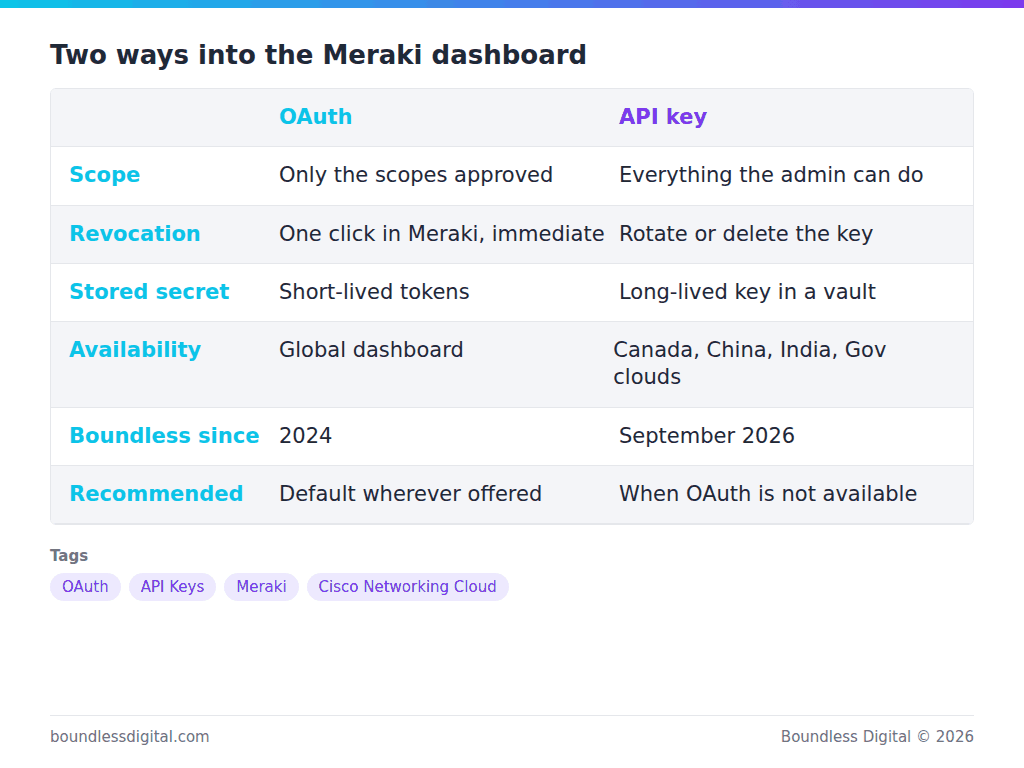
An API key is a long-lived secret generated by a dashboard administrator. It carries that administrator’s full permissions, on every organization they can see, until someone rotates or deletes it. It is simple, universal, and dangerous in the wrong hands.
OAuth is an authorization flow. The administrator signs in to Meraki, sees the scopes the platform is requesting, and approves. The platform receives tokens limited to those scopes and to the organizations selected. Access can be revoked from the Meraki side at any time without touching the platform.
Boundless chose OAuth when Meraki opened it in 2024, and for two years it was the only way to connect. That decision still holds as the default.
Why OAuth is the right default
Three properties matter to a security team.
Least privilege. A backup product does not need the ability to delete an organization. With OAuth, it cannot have it. With an API key, it has whatever the human who generated it has.
Revocation. Removing a platform’s access is an action in the Meraki dashboard, visible in the Meraki audit trail, and effective immediately.
No stored master secret. Tokens are short-lived and refreshed. There is no single string that, if leaked, opens every organization.
Where OAuth is honest about its limits
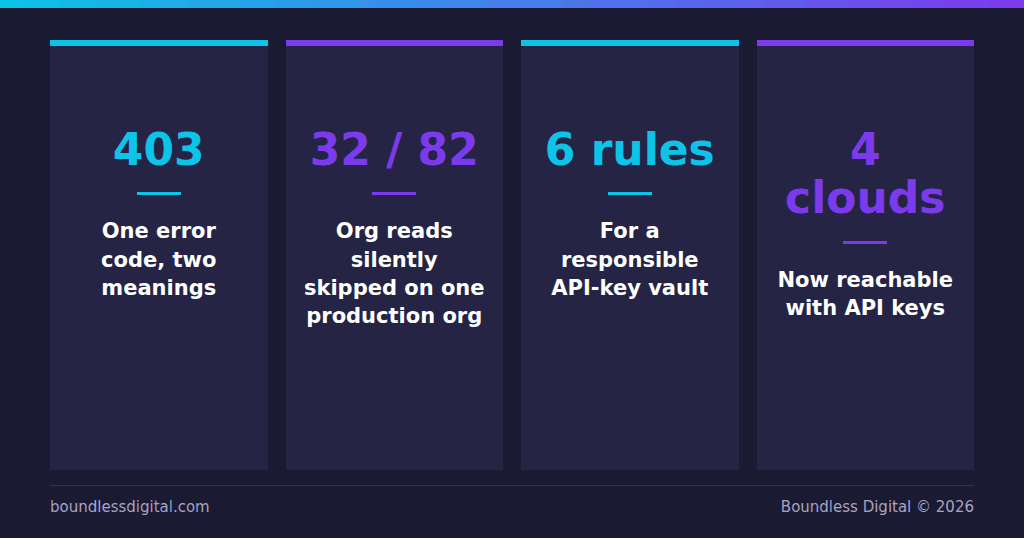
Scopes cut both ways. If the platform lacks a scope for a feature your organization uses, the Meraki API returns 403. The same 403 comes back when the feature is simply not enabled on your org.
A careless integration treats both as “not applicable” and reports success. We found this in our own backups: on one production organization, 32 of 82 organization-level reads were failing on scope, and the snapshot still reported clean. Safeguard now classifies a scope-related 403 as a coverage gap, counts it separately from features that are genuinely absent, and logs it where engineers see it.
Ask any vendor: when a scope is missing, what does your product tell me? If the answer is nothing, the backup is not the backup you think it is.
Where OAuth is not available
Meraki OAuth is offered on the global dashboard. Regional and sovereign clouds, including Canada, China, India and the Government cloud, use API keys. Customers there are often the ones with the strictest requirements: regulated retail, manufacturing supply chains, public-sector adjacent work.
So a platform that only supports OAuth is telling those customers to wait. Boundless added Meraki API key management in September 2026, with rules designed to close the gap between the two methods.
What a responsible API-key implementation looks like
If you must hand a platform an API key, insist on the following. These are the rules Boundless applies.
The key is stored in a dedicated encrypted vault, not in an application table. Encryption is bound to the workspace, so a key can only be decrypted in the context it was created for.
The key is never returned to a browser or an API client after it is saved. Backend only.
Only organizations where the key holds full administrator access can be connected. Partial permissions produce partial backups and confusing failures, so they are refused up front.
Orphaned credentials are cleaned up automatically. An hourly reconciliation removes vault entries that nothing references any more, after a grace period.
OAuth and API-key organizations are visible in one directory, with a filter showing the connection method. You should always be able to answer “how is this org connected?” in one click.
When a credential stops working, the platform pauses collection for that organization, tells you, and resumes on its own once access is restored. It does not hammer the API with failing calls.
Decision rule
Global Meraki dashboard: use OAuth. Ask the vendor how they report scope gaps.
Regional or Government cloud: use an API key from a dedicated service administrator, and hold the vendor to the six rules above.
Either way: check that the platform’s own audit log shows who connected what and when.
Frequently asked questions
Can I mix OAuth and API-key organizations in one Boundless workspace? Yes. They appear in the same Organizations directory with a connection-method filter.
Does an API key give Boundless more access than OAuth? It gives whatever the generating administrator has. That is why Boundless requires full administrator access and stores the key in a vault, and why OAuth remains the recommended path wherever Meraki offers it.
What happens when I revoke access on the Meraki side? Polling and collection pause automatically for that organization. Your history is kept. Reconnecting resumes it.
Learn More
Safeguard is available on the Cisco Networking App Marketplace and Cisco GPL.
Visit marketplace.cisco.com to see how Boundless can help your network team operate with confidence.